In this part you program the data plane of a BlueField-3: you tell the NIC what to do with packets in its own hardware, at line rate, before any CPU sees them. You will write a program that marks live RoCE traffic with an ECN congestion signal. Later, in the second part of the tutorial, you will build a congestion controller on the Bluefield that reacts to those same signals.
Step 1 — The card, and getting traffic onto it
Your card has two ports reachable to each other (p0 and p1), so whatever leaves p1 arrives at p0,
and vice versa.
That makes a single card behave like a small two-node network talking to itself.
In this tutorial, we will be using two endpoints composed of
lightweight virtual NICs called SFs (sub-functions), one per port, each in its own network
namespace so the kernel cannot short-circuit them locally:
INFO — what is a sub-function? A sub-function (SF) is a lightweight virtual NIC carved out of a physical port. It shows up as its own network device. We create one SF on each side and use the two of them as the endpoints of a network flow — so a single card can play both "sender" and "receiver" across the cable.
The client sends RDMA WRITEs over p1, which are later received on p0 and ultimately fed to the server.
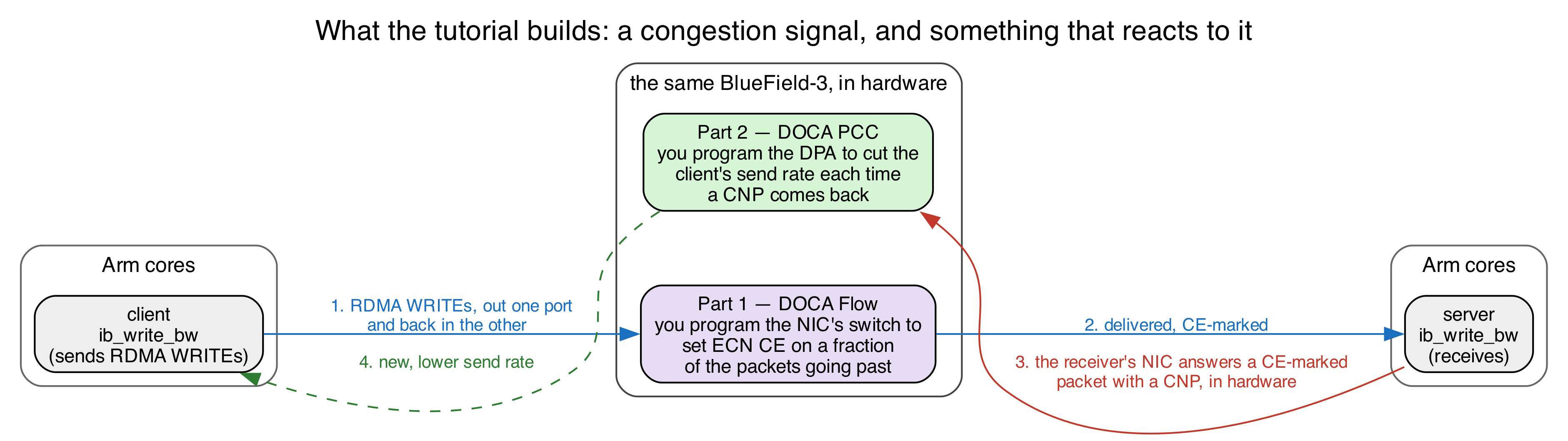
What you will be reproducing is an everyday situation in a datacenter network: a sender is going as fast as it can, the network becomes congested, a switch on the path signals that congestion by setting the ECN bits in the IP header, and the sender slows down. Here, your card simulates the congested switch — no congestion actually exists, but you will be manufacturing the congestion signal by configuring the Bluefield to mark the ECN bits on the packets.
As such, we split this tutorial into two parts:
- Part 1, this guide. Program the NIC to set the ECN "congestion experienced" (CE) mark on a fraction of the client's packets going through the NIC — you choose the fraction. Everything happens in hardware; your program only installs the rules, then sits idle printing counters.
- Part 2. Program the Bluefield's DPA to react: the server's NIC answers a CE-marked packet with a congestion notification, and your algorithm turns each one into a lower send rate for the client.
The network devices of the physical ports. The two physical ports are visible as soon as you log in:
$ ip -br link show | grep -E '^p0|^p1'
p0            UP    f0:fb:7f:e2:e2:76 <BROADCAST,MULTICAST,UP,LOWER_UP>
p1            UP    f0:fb:7f:e2:e2:77 <BROADCAST,MULTICAST,UP,LOWER_UP>
These MAC addresses are specific to whichever card you are using, so yours might read differently.
The RoCE endpoints. In this tutorial, we will work with RoCE (RDMA over Converged Ethernet)
traffic, the high-speed, kernel-bypass transport used in AI and storage networks. RoCE doesn't use
normal sockets. Instead, programs reach it through RDMA devices named mlx5_{N}. Each SF has one,
and it is only visible from inside that SF's namespace:
$ sudo ip netns exec ns0 rdma link show
link mlx5_2/1 state ACTIVE physical_state LINK_UP netdev enp3s0f0s0   # the server's SF
$ sudo ip netns exec ns1 rdma link show
link mlx5_3/1 state ACTIVE physical_state LINK_UP netdev enp3s0f1s0   # the client's SF
Run
rdma link showoutside a namespace and none of that appears. You getmlx5_0andmlx5_1— the two physical ports — each listing dozens of ports, most of themDOWN. That is the switch's own view, not the endpoints'.mlx5_2andmlx5_3are the names you want, andip netns execis what makes them visible.
Step 1.1: wire up the two endpoints.
The two ports are wired into a loopback and split into two isolated network sandboxes (Linux
network namespaces) called ns0 and ns1, one SF in each, each with its own IP address
(mlx5_2 → ns0 → 10.0.0.1, mlx5_3 → ns1 → 10.0.0.2). This is already set up for you on
the tutorial card, so there's nothing to run here.
| Endpoint | RDMA device | Namespace | IP | Role |
|---|---|---|---|---|
| SF on port 0 | mlx5_2 |
ns0 |
10.0.0.1 |
RoCE server (receives) |
| SF on port 1 | mlx5_3 |
ns1 |
10.0.0.2 |
RoCE client (sends) |
INFO — what is a network namespace? It is a private, isolated network stack inside one Linux machine — its own interfaces, IPs, and routes. Putting each SF in its own namespace (
ns0,ns1) is what makes them behave like two separate hosts even though they live on the same card. You run a command "inside" a namespace withip netns exec <name> <command>.
Step 1.2: put real traffic on the loopback.
We generate traffic with ib_write_bw — a standard RoCE benchmarking tool (from the perftest
package) that measures how fast one endpoint can write data to another. It needs a server
(receiver) and a client (sender).
Try it yourself! Send RoCE across the cable and measure it!
Open two terminals, both on the Arm cores.
Terminal 1 — the receiver (server). Start this one first; it waits for a client:
INFO — what the flags mean:
ip netns exec ns0runs it inside thens0sandbox;-d mlx5_2uses that namespace's RDMA device;-Rsets the connection up via the RDMA connection manager (keep this on — Part 2 needs it);-x 1picks the RoCEv2 address;-Fignores a CPU-frequency warning;--report_gbitsprints the result in gigabits/second. It prints its settings and then says it is waiting for a client.
Terminal 2 — the sender (client). Point it at the server's IP, 10.0.0.1:
You should see a results table appear on both terminals, with the throughput closely matching the card's line rate:
To avoid retyping the flags, the repo wraps these as scripts, in scripts/ at the top of the
repository: run_server.sh and run_client.sh (one per terminal), or benchmark.sh, which
starts both ends together in a single command and streams the sender's throughput (Ctrl-C stops
both). We recommend using benchmark.sh from Step 3 onwards, where it is reached as
../scripts/benchmark.sh.
Step 2 — Understanding DOCA Flow
Interacting with a BlueField-3 typically entails interfacing with — and often independently programming — four different architectural components:
| Where | What it is | Used for |
|---|---|---|
| Host x86 | The server the card is plugged into | Not used here |
| Arm cores | General purpose cores on the card | Where you'll be working |
| NIC ASIC / eSwitch | The match-action pipeline inside the NIC | Packet modification (Part 1) |
| DPA | RISC-V engine on the data path | Congestion control (Part 2) |
DOCA Flow is the NVIDIA library that allows you to program the Bluefield's eSwitch, allowing you to make packet modifications on the fly as they traverse the NIC's ASIC. Your DOCA Flow program builds a small graph of pipes, and each pipe answers four questions:
| Part | The question it answers | Example |
|---|---|---|
| match | which packets does this pipe act on? | all IPv4 packets |
| monitor | how many packets hit it? | a hardware counter you can read |
| actions | what do we change in the packet? | modify the destination IP address |
| forward | where does the packet go next? | another pipe, a port, the CPU, or drop |
You describe these rules once, at startup. The NIC then applies them to every packet in hardware, while your program sits idle printing counters. That is the whole idea: match, count, modify, forward.
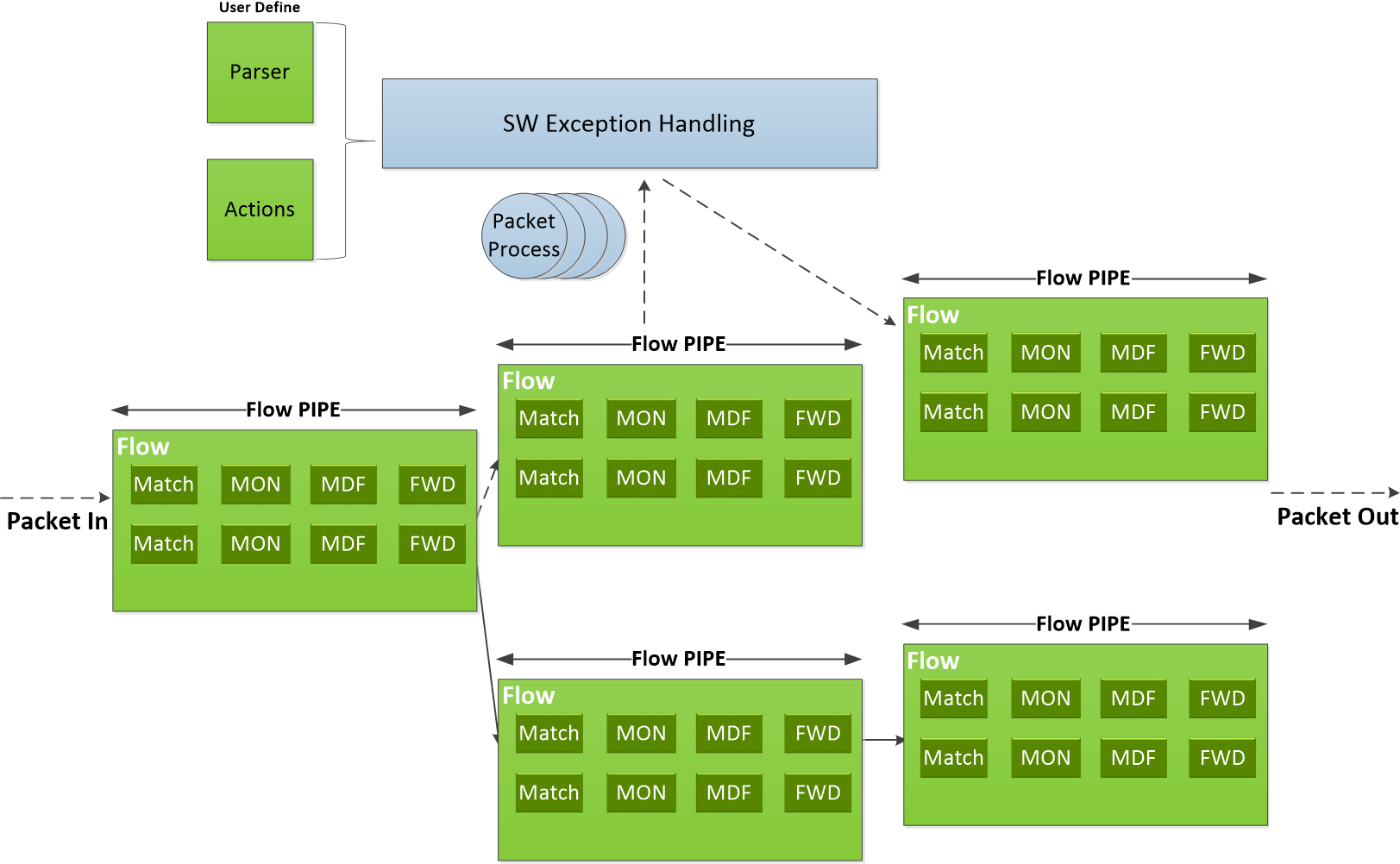
Two details about pipes are worth getting straight before you write any:
-
Pipe = which fields. Entry = what values. A pipe is a template: writing
0xFFinto a field of its match means "this field participates", and0x00in the mask means "…but do not actually compare it". The entry you add afterwards supplies the value really compared. Creating a pipe installs no rule in the hardware; adding an entry does. The same split applies to actions — the pipe declares "entries may rewrite this field", the entry says "…to this value". -
One pipe is the root. Every packet entering the eSwitch starts its lookup at the pipe marked
is_root. No packet reaches other pipes unless the root sends it there. The program you are given ships with a root pipe that forwards packets to the server; the exercise is to put your own pipeline in between.
Step 3 — Build the pipeline
The repository (/home/s26t/sigcomm26-tutorial-bluefield-participants) has one directory per DOCA release:
doca-2 and doca-3. Pick the relevant one for your chosen Bluefield.
Which of the two is yours? Run this command to find out which version of DOCA is installed on your card:
Only the first number matters: 2.x → use doca-2, 3.x → use doca-3. The
exercises are identical in the two versions, down to the same three TODOs, differing only in a
few DOCA calls renamed between the generations, which are already written for you in each tree.
Move into your version's directory now, and stay there for the rest of Part 1:
This is the only place the version is ever named. Every command from here on is written relative to that directory, so you can paste them as they are whichever card you are on.
In this part of the tutorial, you will be editing the doca-flow/doca_flow_ecn.c file.
Everything in doca-flow/doca_flow_ecn.c is done except for three function bodies, marked
TODO 1 to TODO 3. The program already forwards traffic as shipped.
The doca_flow_ecn.c file is laid out in four phases. We use python-like pseudo-code to show you
these logical components:
def doca_flow_ecn_main():
    # Phase 1: setting up logging and argument parsing
    setup_logging()
    parse_args()                        # --percent

    # Phase 2: bring up the device and library. None of this is pipeline work
    dev = open_and_probe_dev(0)         # PF0, probed into DPDK with its SF representor
    configure_and_start_dpdk_port(dev)  # packet buffer pool, RX/TX queues
    initialize_doca_flow()              # switch mode, hardware steering, counters
    port = port_start(dev)              # the PF0 proxy port -- must be started first
    sf = rep_port_start(...)            # the server SF's representor

    # Phase 3: actually program the DOCA Flow pipeline
    build_pipeline(port, cfg, out)      # <-- **all** of your work will be here

    # Phase 4: runtime logic (just reporting) and teardown
    run_report_loop()                   # print the counters, once a second
    teardown()
Those are the real function names, so you can grep for any of them. The pipeline itself is six functions at the bottom of the file:
| Function | What it does | |
|---|---|---|
build_pipeline() |
given | Calls the pipe creation functions |
create_passthrough_pipe() |
given | Forward everything to the server, unchanged |
create_root_pipe_nop() |
given | The root pipe as shipped: wire to server and back |
create_root_pipe() |
TODO 1 | Yours — the same, but into your chain |
create_forward_to_sf_pipe() |
TODO 2 | Forward, count, and set the CE mark when asked |
create_sampling_pipe() |
TODO 3 | Send 1 packet in N down the marking path |
build_pipeline() is the one to read closely: it is the whole exercise in a single function, and
it ships wired as a plain forwarder. In this function, note what wire_target does: it starts out
as PASSTHROUGH — a working forwarder on its own, and all Step 4.1 needs — and is then reassigned to
whichever pipe wire traffic should really enter as you add the pipes in front of it. PASSTHROUGH
stays in the pipeline either way: it is where MARK and PASS send anything they do not match.
Step 4 — The actual tutorial exercise
We use meson and ninja to setup and build our applications. You only need to setup once, but
you do need to recompile with ninja every time you make changes to your program. All three
commands run from inside the version directory you moved into in Step 3:
# Setting up the build directory (only once)
$ meson setup build

# Compile the application
$ ninja -C build

# Run the doca flow application
$ sudo ./build/doca-flow/doca_flow_ecn -- --percent 100
The
--matters. Everything before it goes to the DPDK library; everything after it is for this program.--percent Nis the only flag it takes: CE-mark this share of packets,[0, 100], default 100.
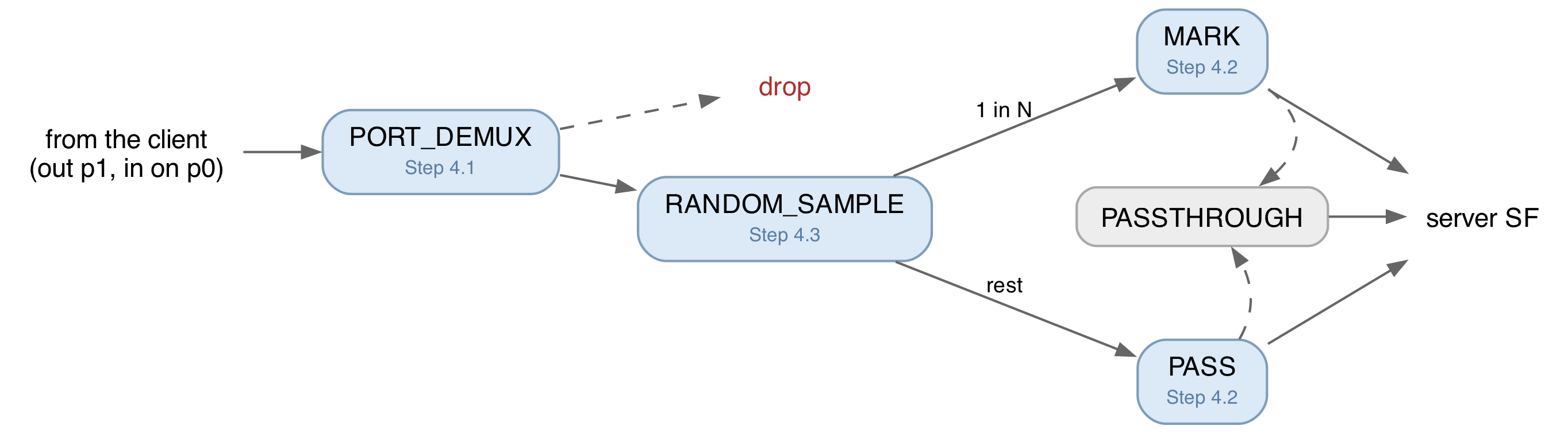
Figure 3 shows the DOCA Flow pipeline you will build. Each blue pipe is one function, written in the section
it is labelled with. Not drawn: PORT_DEMUX's second entry, sending everything coming back from
the server straight out to the wire.
Step 4.1 — Write the root pipe (PORT_DEMUX)
First, run it exactly as it comes. Traffic should sit at line rate — 92 or 184 Gb/s depending on the card — and the counter line should stay at zero:
s26t@bluefield-lisbon-1:~/sigcomm26-tutorial-bluefield-participants/doca-2$ sudo ./build/doca-flow/doca_flow_ecn -- --percent 100
EAL: Detected CPU lcores: 16
EAL: Detected NUMA nodes: 1
EAL: Detected shared linkage of DPDK
EAL: Multi-process socket /var/run/dpdk/rte/mp_socket
EAL: Selected IOVA mode 'VA'
TELEMETRY: No legacy callbacks, legacy socket not created
EAL: Probe PCI driver: mlx5_pci (15b3:a2dc) device: 0000:03:00.0 (socket -1)
[01:49:05:767697][2777301][DOCA][INF][doca_flow_ecn.c:213][configure_and_start_dpdk_port] mbuf data room 9344 bytes (jumbo-capable, max frame 9216)
[01:49:06:723850][2777301][DOCA][WRN][engine_model.c:92][adapt_queue_depth] adapting queue depth to 128.
[01:49:07:756283][2777301][DOCA][INF][doca_flow_ecn.c:693][create_root_pipe_nop] No-op forwarder ready: wire <-> receiver SF, nothing marked
[01:49:07:756313][2777301][DOCA][INF][doca_flow_ecn.c:383][log_startup] Marking ALL IPv4 -- Ctrl-C to stop
[01:49:08:004432][2777301][DOCA][INF][doca_flow_ecn.c:401][run_report_loop] CE marked: 0, passthrough: 0 (0% marked)
[01:49:09:004436][2777301][DOCA][INF][doca_flow_ecn.c:401][run_report_loop] CE marked: 0, passthrough: 0 (0% marked)
Currently, the pipeline is pre-configured with a root pipe that simply forwards packets from the wire
straight to the server, and performs no additional operation. This pipe is created in the function
create_root_pipe_nop().
Now stop it with Ctrl-C, leaving the traffic (benchmark.sh) running. Throughput carries on unchanged, aside from
a small dip as the card falls back to its default OVS forwarding. Start the program again
and it takes over (notice again the small temporary dip in throughput).
Why this matters. The instant a DOCA Flow program starts, it owns the NIC's switch, and from then on the NIC forwards only what your pipes say to forward.
create_root_pipe_nop()is what keeps traffic moving. Take it away with nothing in its place and everything stops: an empty pipeline does not mean "pass traffic through", it means "drop everything".
Updating the pipeline building mechanism. In build_pipeline(), comment out the call to the no-op root
pipe (create_root_pipe_nop), and uncomment the two lines tagged // [1].
Now start writing your own root pipe. Let's now fill in create_root_pipe()
— its two gaps are TODO 1a and TODO 1b. Every pipe is built the same way, in two layers:
- The pipe is a template. When you create a pipe you describe its shape — which header fields
it matches on, which fields its actions may rewrite, and where a match forwards — but not the
concrete values. You mark a field with
0xFFto mean "this field participates," without yet saying what to look for. The call that compiles that shape into the hardware isdoca_flow_pipe_create(). - Entries fill in the values. A freshly created pipe does nothing until you add at least one
entry, and each entry supplies the concrete values for the fields the pipe declared — "match
IPv4 packets with this DSCP/ECN byte," "rewrite the ECN bits to this value." One pipe can carry
many entries (a root pipe, for instance, has one per direction). You add an entry with
doca_flow_pipe_add_entry(), then install it in the NIC withdoca_flow_entries_process().
So the one idiom behind every pipe: the pipe says which fields, the entry says what values — and the same split applies to actions (the pipe declares "entries may rewrite this field," the entry supplies the value to write).
You are not writing from a blank page. Take heavy inspiration from create_root_pipe_nop() directly
above create_root_pipe(), because you are writing almost the same pipe:
- (TODO 1a) Match on the ingress port,
match.parser_meta, with a full mask so it is compared exactly. This is the field that says which side a packet came from. - (TODO 1a) Forwards:
DOCA_FLOW_FWD_CHANGEABLEfor a hit — meaning "each entry brings its own destination" — andDOCA_FLOW_FWD_DROPfor a miss. - (TODO 1b) Two entries. From the wire (
PF_PORT_ID) towire_target, and from the server's SF (SF_REP_PORT_ID) out toPF_PORT_ID. Install the first withWAIT_FOR_BATCHand the second withNO_WAIT, so both reach the hardware together.
The only real difference from the no-op is that first entry: the no-op forwards wire traffic to a
port (DOCA_FLOW_FWD_PORT), yours forwards it to a pipe (DOCA_FLOW_FWD_PIPE,
next_pipe = wire_target). That is the whole distinction between a forwarder and a pipeline, and it
is what lets you insert anything at all into the path.
Keeping the two directions apart is not cosmetic. The return path carries the RoCE acknowledgements and the congestion notifications the Part 2 controller reacts to; marking those would corrupt the very feedback you are trying to create.
Rebuild and run. Traffic should be back at line rate, now through your pipe rather than the shipped
one, with the counters still at zero — wire_target is PASSTHROUGH, which counts nothing.
Step 4.2 — Mark every packet
Uncomment the rest of the block in build_pipeline(), then fill in create_forward_to_sf_pipe() —
TODO 2a and TODO 2b.
This one function builds both of the forwarding pipes. build_pipeline() calls it twice:
once to build a pipe that does not mark the packets' ECN bits ("PASS" in Figure 3), and once to
build a pipe that does mark them ("MARK" in Figure 3).
Everything the two have in common — the match, the counter, the forwards — you write unconditionally.
The two steps that are specific to the marking pipe are the action template in TODO 2a and the value
the entry writes in TODO 2b.
Take inspiration from create_passthrough_pipe(), right above create_forward_to_sf_pipe():
this is essentially the same pipe but with a counter and an action added.
- Match any IPv4 packet whatever ECN bits it arrived with, using the wildcard idiom from
Step 2:
outer.ip4.dscp_ecnas0xFFin the pipe's match,0x00in the mask. Reset that byte to0x00before adding the entry — the same struct is reused as the entry's values. - A counter, via
monitor.counter_type = DOCA_FLOW_RESOURCE_TYPE_NON_SHARED. Without it theCE marked:line stays at zero and you cannot tell whether anything works. - The marking action, when
markis true: declareouter.ip4.dscp_ecnas0xFFin a pipe-level action template, and have the entry write the value. RFC 3168 gives the two-bit ECN field asNot-ECT 00,ECT(1) 01,ECT(0) 10,CE 11, so the byte you want is0x03. - Forwards: a hit goes to the server's SF; a miss goes to
miss_pipe, which isPASSTHROUGHand forwards everything. Nothing is dropped here — the match only decides what gets counted and marked, so non-IPv4 (ARP and the like) travels on untouched. A miss may only be a pipe or a drop, never a port, which is why the fallback is a pipe. - Hand the installed entry back through
out_entry— that is what the counter report queries.
Rebuild and run with --percent 100. Traffic should be at line rate, and now the counter climbs:
You just programmed the Bluefield to rewrite packet headers in hardware, at line rate, with your program running on the Arm cores doing nothing but printing the counter once a second.
Step 4.3 — Mark only some packets
We will now create Figure 3's RANDOM_SAMPLE pipe by implementing create_sampling_pipe()
(TODO 3a and TODO 3b), which splits traffic across pipes probabilistically in hardware.
The NIC stamps every packet with a random 16-bit value in parser_meta.random. Match it against 0
under mask, which has already been computed for you as a power of two minus one, and exactly
1 packet in (mask + 1) hits. Hits forward to the marking pipe, misses to the non-marking one;
"miss" here means not selected, not an error. The entry itself adds nothing to the template — no
actions, no counter, no forward of its own.
The startup banner prints the fraction actually achieved, rounded down to a power of two. Check it against the counter line, which now has traffic on both sides:
CE marked: 39273726, passthrough: 274903125 (12.5% marked)
CE marked: 40684757, passthrough: 284794849 (12.5% marked)
Checking your work
There is no answer key in your checkout, and you do not need one: the program tells you where you
stand at every step. Traffic back at line rate ends Step 4.1, CE marked: climbing ends Step 4.2, and the two
counters splitting in the ratio you asked for ends Step 4.3. When one of those does not happen, the
debugging tips below name the usual cause.
Ask an organiser if you are stuck. That is what we are here for.
Debugging tips
- Read the last error line, not the first. A failed pipe prints a wall of internal DOCA errors.
The final
[CRT]...[doca_check] <name>: <reason>line names the pipe, and that name is the function to open. - Nothing forwards at all — expected in the middle of Step 4.1, once the no-op call is commented out
and
create_root_pipe()is still empty. If it persists, check thatdoca_flow_pipe_create()ran and thatdoca_flow_entries_process()accounted for both entries. - Traffic stops the moment you uncomment the rest of the block — a forward points at a pipe that
was never built.
create_forward_to_sf_pipe()andcreate_sampling_pipe()returnNULLuntil you write them, and a root pipe aimed atNULLforwards nowhere. CE marked:stays at 0 — your marking pipe has no counter (monitor.counter_type), or the root pipe is still aimed atPASSTHROUGHrather than at the marking pipe.- The client connects and then stalls — the root pipe's second entry, server SF back out to the wire, is missing or points the wrong way. RoCE needs both directions.
- A pipe fails to install — check the status after
doca_flow_entries_process(), per the pipe-and-entry idiom in Step 4.1. Success from the add-entry call alone proves nothing. EAL initialization failed, thenargp: doca_argp_start(...)— a copy of the program is already running, and only one DOCA Flow program can own the switch at a time. This is the one case where the last line misleads: it blamesargp, but nothing is wrong with your arguments. Stop the other instance; if it was killed hard,sudo pkill -f doca_flow.defined but not usedwarnings — that is the list of functions you have not wired up yet. Expect five before you start; they clear as you uncomment in Step 4.1 and Step 4.2.
What you built
You can now treat the card as a two-port loopback carrying real RoCE traffic; follow how match/count/modify/forward pipes chain from a root pipe; and write a pipeline that takes over the NIC's switch, matches IPv4, counts it, rewrites its ECN bits to CE, and forwards it — all in hardware, at line rate, with your program idle. That CE mark is exactly the signal the congestion controller in Part 2 reacts to.
\newpage
Appendix A — The BlueField, in more detail
Reference material. You do not need any of this to finish the exercise.
Interacting with a BlueField-3 typically entails interfacing with — and often independently programming — four different architectural components:
| Where | What it is | Used for |
|---|---|---|
| Host x86 | The server the card is plugged into | Not used at all in this tutorial |
| Arm cores | Cortex-A78 cores running their own Ubuntu on the card | Where you log in, build and run |
| NIC ASIC / eSwitch | The match-action switch inside the NIC | What you program in Part 1 |
| DPA | Datapath Accelerator: a many-threaded RISC-V engine on the data path | The congestion controller, Part 2 |
The cards are configured in DPU mode (also called embedded-CPU-function ownership, ECPF): the Arm subsystem owns the NIC's resources, and the host x86 sees only a plain network device.
Functions: PFs, VFs and SFs
A function is what the NIC exposes so that software can send and receive packets through it. It is not a piece of software, but a slice of the NIC hardware, with its own queues, its own MAC address, and its own identity on the network. There are three kinds of functions:
- PF (physical function): the real PCIe device the NIC presents. A BlueField-3 has one PF per physical port. These are the functions that own the hardware.
- VF (virtual function): an SR-IOV slice of a PF, created so that a virtual machine can be handed something that looks like its own NIC. Not used in this tutorial.
- SF (scalable function, also called a sub-function): the same idea as a VF, but not tied to
PCIe. An SF is created on the Arm with
mlnx-sf, is much cheaper than a VF, and you can have far more of them. This tutorial uses SFs as its traffic endpoints.
Each function shows up on the Arm's Linux as two different devices:
| Interface | What it is | Example |
|---|---|---|
| netdev | An ordinary Linux interface — what ip link lists and ping uses. |
p0 |
| RDMA device | The same function through the RDMA stack, bypassing the kernel. | mlx5_0 |
In this tutorial we use RDMA over Converged Ethernet (RoCE), which is RDMA carried inside
ordinary UDP/IP packets, so we use the RDMA devices (mlx5_N). Because RoCE is just UDP/IP on the
wire, the switch inside the NIC can match and rewrite it like any other packet.
| Function | RDMA device | Netdev |
|---|---|---|
| PF0 | mlx5_0 |
p0 |
| PF1 | mlx5_1 |
p1 |
| SF on PF0 | mlx5_2 |
enp3s0f0s0 |
| SF on PF1 | mlx5_3 |
enp3s0f1s0 |
The eSwitch
The eSwitch (embedded switch) is a hardware block inside the NIC that forwards packets between every function and every physical port on the card. Every packet that arrives from the wire and every packet a function transmits passes through it, and it decides where that packet goes. It is the single most important component in this part of the tutorial, and we use DOCA Flow to program it.
Its rule table is called the FDB (forwarding database). Each PF (port) owns its own logical eSwitch domain, with its own rules, so programming PF0's eSwitch leaves PF1's forwarding untouched.
Every endpoint the eSwitch can send a packet to is a vport (virtual port): the physical ports are vports, and so is every PF, VF and SF. The eSwitch does not reach an SF directly, though. It reaches the SF's representor — a switch-side netdev that stands in for it. The two are the same function seen from opposite sides:
- from inside the namespace or VM using it, the SF appears as its netdev and its
mlx5_NRDMA device — this is where an application sends and receives; - from the switch's side, the same SF appears as its representor, which is what a forwarding rule names.
So "deliver this packet to the receiver" is written, in a rule, as "output to that representor's
vport" — and the packet then pops out of the corresponding mlx5_N device inside the namespace. In
NVIDIA's figure below, rep0 and rep1 are the representors of VF0 and VF1; substitute SFs for
VFs and it is our layout exactly, with the DOCA Flow application running on the Arm.
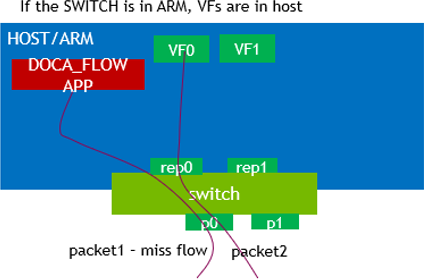
By default, each PF's vports are wired together by an OVS bridge with hardware offload — the "normal" forwarding path that makes the card behave like an ordinary NIC when nothing else is running. A DOCA Flow program replaces that for the PF it attaches to, from the moment it starts until it exits.
The whole round trip
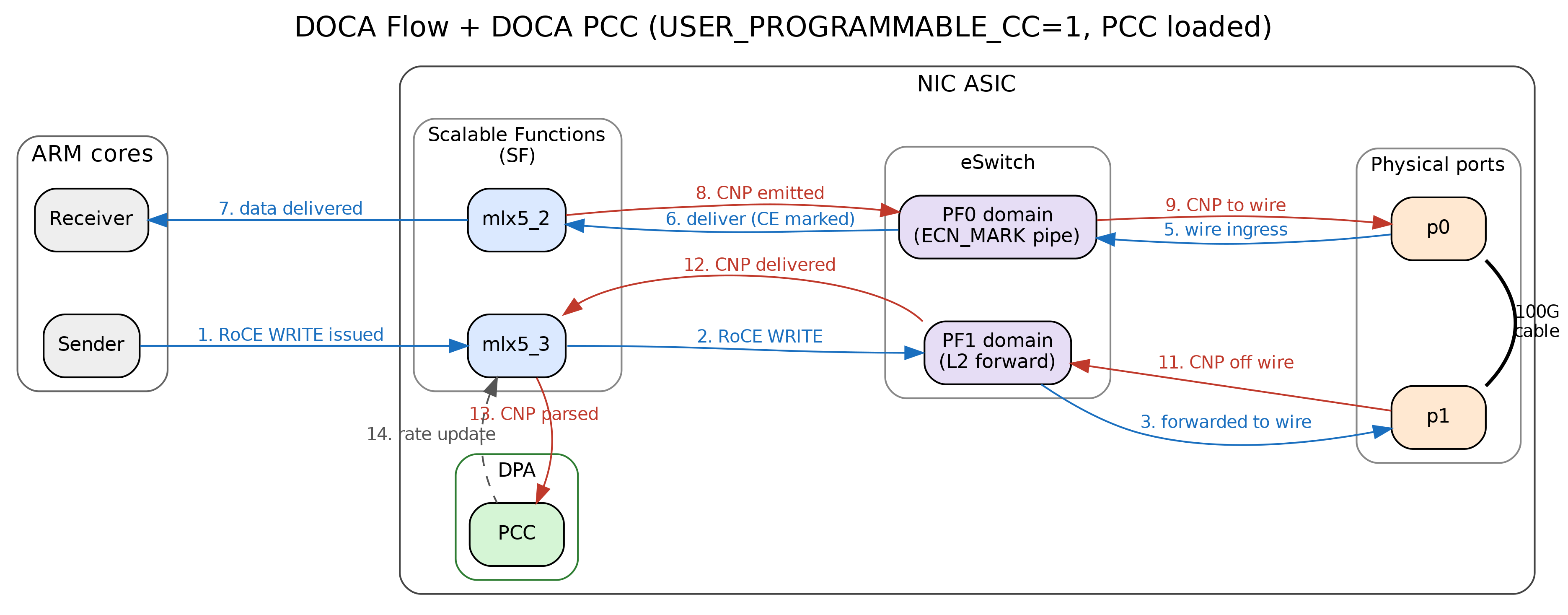
The client issues an RDMA WRITE through mlx5_3; PF1's eSwitch — untouched by you — sends it out
p1; it crosses the cable to p0; PF0's eSwitch, your pipeline, marks and forwards it; the
server receives it via mlx5_2; the server's NIC answers a CE-marked packet with a CNP
(Congestion Notification Packet) in hardware; the CNP travels back the same way; and on the client's
side it raises an event on the DPA, where the Part 2 algorithm sets a new send rate.
Appendix B — DOCA Flow concepts in full
Reference material. Step 2 has the working subset.
Port. A DOCA Flow handle on one vport. In switch mode the PF uplink is also the proxy port (switch-manager port): it must be started first, and every pipe belongs to it — even pipes that forward somewhere else entirely.
Pipe. A flow table, not a pipeline stage. NVIDIA's wording: a pipe "is a template that defines packet processing without adding any specific hardware rule".
| Pipe type | What it does |
|---|---|
BASIC |
Ordinary match-action table |
CONTROL |
Entries carry priorities (0-7), resolving conflicts between overlapping matches |
LPM |
Longest-prefix match, for routing-table-shaped lookups |
ACL |
Five-tuple matching with masks |
ORDERED_LIST |
A fixed sequence of actions per entry, when their order matters |
HASH |
Selects an entry by an index computed from a hash, rather than by matching fields |
Entry. A concrete rule inside a pipe.
Match. Each field is ignored (left zero), constant (set in the pipe, the same for all entries), or changeable (all-ones placeholder in the pipe, real value supplied per entry).
Actions. Mostly field rewrites — MAC, IP, DSCP/ECN, L4 ports, metadata — but also encapsulation and decapsulation. Matches and actions are not alternatives to one another: every entry has a match, and may additionally have actions, a monitor and a forward.
Monitor. Counters, meters, and (on 2.x) mirroring.
Forward. Where the packet goes when the lookup finishes. Each pipe has a hit forward and optionally a miss forward:
| Forward | Meaning |
|---|---|
DOCA_FLOW_FWD_PORT |
Output to a vport: a physical port, or a function's representor |
DOCA_FLOW_FWD_PIPE |
Jump to another pipe — this is how pipes chain |
DOCA_FLOW_FWD_RSS |
Deliver to a receive queue of your program, on the Arm cores |
DOCA_FLOW_FWD_DROP |
Discard |
DOCA_FLOW_FWD_CHANGEABLE |
Each entry brings its own forward |
DOCA_FLOW_FWD_HASH_PIPE |
Jump to a hash pipe, naming the algorithm to run (3.x) |
Shared resources. Objects living on the port rather than inside one pipe, so several pipes can point at a single instance: meters, counters, RSS contexts, encap/decap contexts — and, on 2.x, mirrors, which duplicate a packet towards a second destination. Mirrors were removed in DOCA 3.2, and copying traffic into a capture file is where the two versions diverge hardest over it: a shared mirror on 2.x, a flooding hash pipe on 3.x. Neither is part of this exercise.
Parser metadata. parser_meta holds values the hardware parser attaches to each packet, rather
than header fields: outer_l3_type (what the parser saw), random (a fresh 16-bit value per packet,
which is what makes hardware sampling possible), and the ingress port.
Note that outer.ip4.dscp_ecn is the whole TOS byte, so writing 0x03 sets ECN to CE and
clears DSCP. Our traffic carries DSCP 0, so it makes no difference here.
Appendix C — The API calls used in this exercise
The headers on the card are the authority: /opt/mellanox/doca/include/doca_flow.h, with packet
field types in doca_flow_net.h. Every call is documented there. This is only a map of which ones
matter here.
grep -n 'dscp_ecn\|parser_meta' /opt/mellanox/doca/include/doca_flow*.h answers most structural
questions faster than the web documentation. In the browser editor, the clangd extension is
already pointed at these headers by the repository's .clangd file, so completion and "go to
definition" work on the DOCA types without any setup.
| Call | What it is for |
|---|---|
doca_flow_pipe_cfg_create / _destroy |
Start and finish describing a pipe |
doca_flow_pipe_cfg_set_name |
Name it — this is what error messages report |
doca_flow_pipe_cfg_set_type |
BASIC, HASH, ... |
doca_flow_pipe_cfg_set_domain |
Which steering domain; always ..._DOMAIN_DEFAULT here |
doca_flow_pipe_cfg_set_is_root |
Mark the one root pipe |
doca_flow_pipe_cfg_set_nr_entries |
How many entries you will add |
doca_flow_pipe_cfg_set_match |
The match template and its mask |
doca_flow_pipe_cfg_set_actions |
The action template(s) |
doca_flow_pipe_cfg_set_monitor |
The counter |
doca_flow_pipe_create |
Create the pipe, with its hit and miss forwards |
doca_flow_pipe_add_entry |
Add an entry — [2.x] and 3.1 |
doca_flow_pipe_basic_add_entry |
Add an entry — [3.x]; takes the action index as an argument |
doca_flow_entries_process |
Drive queued entries to completion, then check the status |
doca_flow_resource_query_entry |
Read an entry's counter (already written, in query_pkts()) |
Version differences
| [2.x] | [3.x] | |
|---|---|---|
| entry install | doca_flow_pipe_add_entry; action index inside doca_flow_actions |
doca_flow_pipe_basic_add_entry; action index as an argument |
| entry flags | DOCA_FLOW_NO_WAIT, DOCA_FLOW_WAIT_FOR_BATCH |
DOCA_FLOW_ENTRY_FLAGS_NO_WAIT, ..._WAIT_FOR_BATCH |
| ingress port match | parser_meta.port_meta (uint32) |
parser_meta.port_id (uint16) |
The version you are on is already handled for you: doca_flow_ecn.c in doca-2/ uses the 2.x
spelling throughout and the one in doca-3/ uses the 3.x spelling, so follow whichever file you
have open rather than translating between them.
doca_flow_compat.h, force-included by the build, already smooths the 3.1-versus-3.4 seam inside the
doca-3 tree. It does not bridge 2.x to 3.x.
The program's own flags
| Flag | Meaning |
|---|---|
--percent N |
CE-mark this share of packets, [0, 100], rounded down to a power-of-two fraction. Default 100. |
Further reading
- DOCA Flow programming guide —
swap the version in the URL to match your card, e.g.
.../archive/2-9-0/doca-flow. - BlueField modes of operation
- BlueField scalable function user guide
- NVIDIA ships around 20 single-concept sample programs on the card. They live under
/opt/mellanox/doca/samples/doca_flow/— one.cfile plus a README each, every one isolating a single idea.