In Part 1 (doca-flow.pdf) you programmed the NIC to mark congestion — you set the CE
bit on packets in the data plane. In this part you write the other side of that story: the
congestion-control algorithm that reacts to those marks, deciding how fast a flow is allowed to
send — and you run it on a set of tiny processors inside the NIC called the DPA.
By the end you will have written the two reactions at the heart of a reaction-point controller, watched a flow's send rate collapse the moment congestion appears and recover when it clears, and tuned how aggressively it reacts.
Prerequisites. (A) You have done Part 1 (
doca-flow.pdf); (B) one firmware knob,USER_PROGRAMMABLE_CC=1, must be live for any PCC program to start (we set this already for you).
Step 1 — Where the algorithm runs
A DOCA PCC program comes in two pieces that run in two different places:
- The host program is just a loader and supervisor. It uploads your compiled algorithm to the NIC, opens the PCC context, and then sits there keeping it alive and printing logs.
- The algorithm runs on the DPA — the Data-Path Accelerator inside the BlueField-3. That is where the C code you'll edit actually executes.
INFO — what is the DPA? It's a cluster of small processors on the NIC's own data path — right by the wire, where the general-purpose Arm cores are too far away to set a per-flow rate fast enough. You write the algorithm in C,
dpacc(a compiler specific to the DPA) compiles it, and the host loader ships it onto the NIC.
What the algorithm produces: a rate. For each flow it writes a target send rate into a results
struct and returns. It never touches a packet or paces anything itself; the NIC loads that rate into
the flow's hardware rate limiter, which paces every packet according to it.
INFO — rate is a fraction, not a bits-per-second. The rate is a fixed-point number where
1 << 20(= 1,048,576) means "100% of line rate." So524288is 50%, and a small floor value is a near-stop. You will see constants like this in the code; just read1 << 20as "full speed."
This split is the key idea of PCC: you write the policy (what the rate should be), the NIC hardware does the work (pacing every packet).
Step 2 — Build the base DPA application
The repository (/home/s26t/sigcomm26-tutorial-bluefield-participants) has one directory per DOCA release:
doca-2 and doca-3. Pick the relevant one for your chosen Bluefield.
Which of the two is yours? Run this command to find out which version of DOCA is installed on your card:
Only the first number matters: 2.x → use doca-2, 3.x → use doca-3. The
exercises are identical in the two versions, down to the same two TODOs, differing only in a
few DOCA calls renamed between the generations, which are already written for you in each tree.
Move into your version's directory now, and stay there for the rest of Part 2:
This is the only place the version is ever named. Every command from here on is written relative to that directory, so you can paste them as they are whichever card you are on.
The PCC program lives in doca-pcc-ecn/, and its layout mirrors the two halves from Step 1 — a
host/ side that loads and supervises, and a device/ side that runs on the DPA:
| File | Runs on | What it does |
|---|---|---|
host/pcc_ecn_rp.c |
Arm | loads your algorithm and supervises it |
device/rp_main.c |
DPA | the entry point and event dispatch |
device/algo/rtt_template.c |
DPA | runs the custom CC algorithm |
NOTE — you edit only one file. The only file you touch in this part is
rtt_template.c(underdevice/algo/). Everything in it is written for you except two function bodies, markedTODO 1andTODO 2, which you fill in Step 3.
The DPA entry point: device/rp_main.c. It holds the callback the DPA runs on every event, which
hands that event straight to your algorithm — rtt_template_algo(), in device/algo/rtt_template.c.
rtt_template_algo() runs once per event, per flow. It can be called by several event types; two of them matter here:
- A CNP event is triggered by the receipt of congestion notifications.
This triggers the call of the function
rtt_template_handle_roce_cnp()indevice/algo/rtt_template.c. Currently it has no effect (it keeps the current rate of the sender unchanged). - A "TX" event is triggered when a batch of packets is sent.
This triggers the call of the function
rtt_template_handle_roce_tx()indevice/algo/rtt_template.c. Currently it also leaves the sender's rate unchanged.
INFO — the NIC batches events for you. At line rate the DPA could never keep up with one event per packet, so the hardware coalesces them: one event stands for many packets. It reacts per batch, while the hardware rate limiter does the per-packet work.
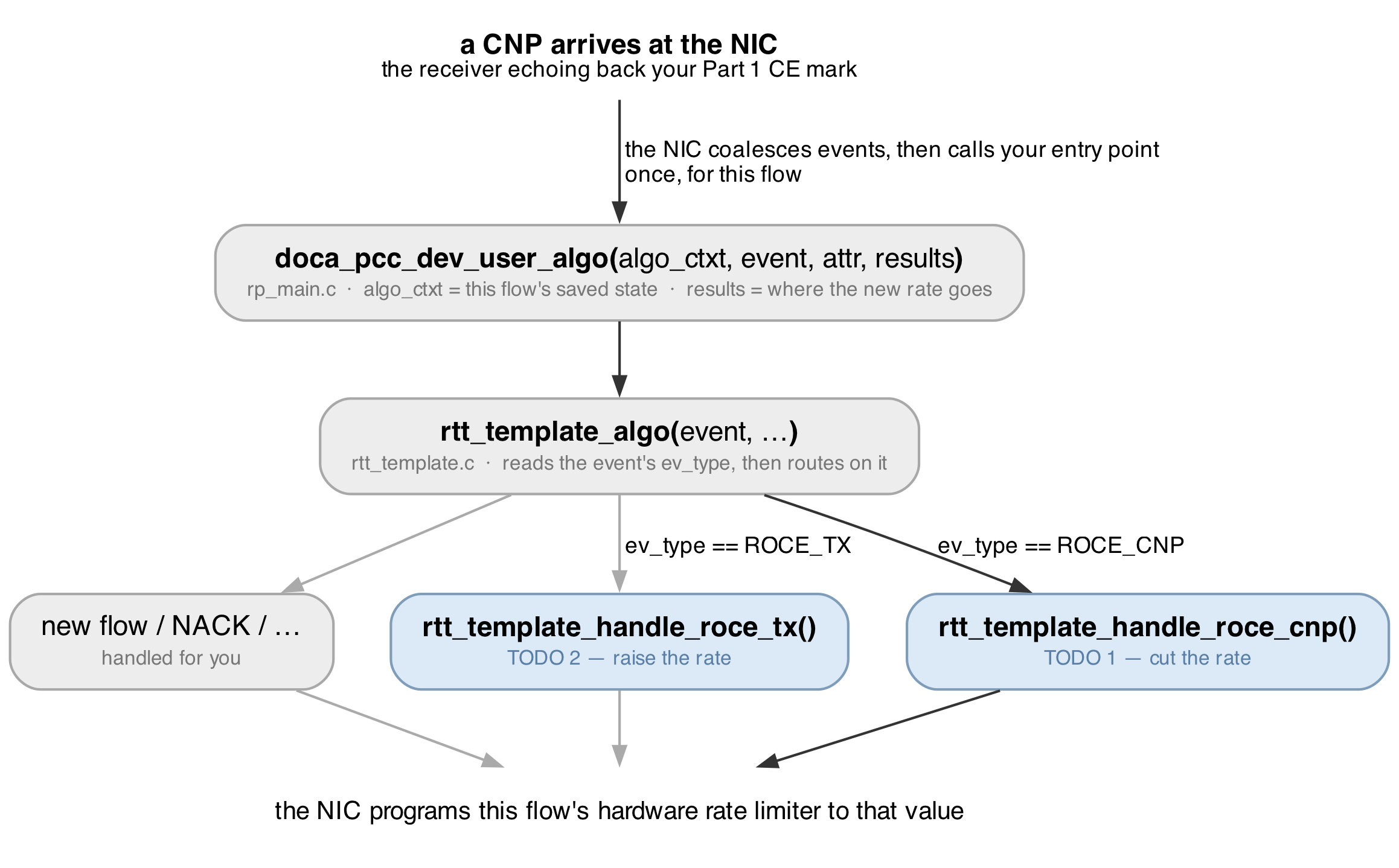
Let's build and run the PCC program in its current state.
NOTE — it does not react yet. If we ran this application as it is, it would not alter the sender's rate based on the CNPs received: both reactions are still empty, and you write them in Step 3.
# Setting up the build directory
# Unlike Part 1, we need to run this every time we edit the code.
$ meson setup --reconfigure build

# Compile the application
$ ninja -C build
The goal of this tutorial is to implement the custom congestion-control algorithm that reacts to the congestion signals and adjusts the sender's rate accordingly.
Step 3 — Implementing the custom CC algorithm on the DPA
The custom CC algorithm has 2 main components, TODO 1 and TODO 2, both in rtt_template.c.
You need to implement:
- A multiplicative decrease reaction to congestion signals, so the sender decreases its rate when congestion is detected.
- An additive increase reaction to the absence of congestion signals, so the sender increases its rate when no congestion is detected.
We will now go over the details of each of these components and how to implement them.
Multiplicative decrease (TODO 1). As CNP events arrive, decrease the rate by a fixed factor, never falling below a floor. Implement this logic in the function rtt_template_handle_roce_cnp():
- Modify the flow's current rate by setting the
cur_ratevariable (input parameter). - Use
ECN_CNP_DEC_FACTORas the multiplicative decrease factor. - Use
doca_pcc_dev_fxp_mult()to perform a fast fixed-point multiplication of the rate by that factor. - Use
MIN_RATEto prevent the rate from dropping below a certain value.
INFO — the one knob that changes its behavior. The decrease factor is a single constant at the top of
rtt_template.c:
Additive increase (TODO 2). When traffic is flowing and no congestion is detected, the rate should
drift back up gently so that we don't cause congestion again. Implement this logic in the function rtt_template_handle_roce_tx():
- Keep a global counter (that persists across calls) so you act only every ~1000th call rather than on every single send event;
- Increment the sender's rate by
AI >> 2.AIis a predefined constant equal to 5% of line rate — it lives inrtt_template_algo_params.h, beside the file you are editing — soAI >> 2, a quarter of it, adds a gentle ~1.25% each time; - Prevent the rate from exceeding
RATE_MAX.
Ask an organiser if you're stuck. That's what we're here for.
Debugging tips
- An edit didn't take effect and
ninjasaidno work to do→ you rebuilt with plainninja. The DPA image is built at configure time, and nothing underdevice/is in ninja's dependency graph, so it cannot see your edit. Rebuild withmeson setup --reconfigure build && ninja -C build. (rm -rf build && meson setup buildalso works and is what to reach for if the build itself looks confused, but it is far slower.) - No
PURE_ECNlines ever appear → no CNPs are reaching the controller. Make sure the Part 1 marker (doca_flow_ecn --percent 100) is running so packets are CE-marked, and that traffic is actually flowing. - Traffic must use
-R(benchmark.shalready does). Without it the flow isn't bound to your algorithm and your handlers never run — the rate won't move at all. - Run it in the foreground (as shown), so its output prints live. Launched in the background over SSH it can appear to die after a few seconds — that's the launch, not the program.
\newpage
Appendix A — The DPA and the two halves, in more detail
Reference material. You do not need any of this to finish the exercise.
Why two halves, and why the DPA. The Arm cores are general-purpose Linux CPUs, too far from the
wire to make a per-flow rate decision fast enough. The DPA (Data-Path Accelerator) is a cluster of
many-threaded RISC-V processors sitting on the data path, built for tiny, frequent, reactive
computation. So the algorithm runs there, and the host program on the Arm is only a loader and
supervisor: it compiles the DPA image (dpacc), uploads it, opens the PCC context, and then keeps the
process alive. Nothing on the host runs per event.
USER_PROGRAMMABLE_CC. Running your own congestion-control code on the DPA is gated by a NIC
firmware setting, USER_PROGRAMMABLE_CC=1. Without it, doca_pcc_ecn_rp refuses to start (it exits a
second or two in). It only takes effect after a full power-cycle of the card, so it's set up for you
ahead of the tutorial. Check it with admin/local_scripts/check_pcc_ready.sh — it should say ready.
Why the controller attaches to PF1 but traffic uses the SFs. Congestion control is a property of
the port/uplink, so the controller attaches to the sender's physical function, PF1 (mlx5_1). The
traffic rides on sub-functions of that port (mlx5_2/mlx5_3). One controller governs all the flows
on its port.
Appendix B — The controller's model in full
Reference material. Step 3 has the working subset.
Rate is a fixed-point fraction. The rate is not bits per second; it is a fixed-point number where
1 << 20 (1,048,576) is 100% of line rate. 524288 is 50%, a small floor value is a near-stop. Your
algorithm writes this number into results->rate; the NIC's hardware rate limiter enforces it until
your code runs again.
Events are coalesced. Your algorithm does not run per packet — at line rate the DPA could never keep up. The hardware batches events so one event stands for many packets, and your handler runs per batch while the rate limiter does the per-packet pacing. That two-tier split is exactly why it keeps up at line rate.
Why the rate collapses so hard at --percent 100. Marking every packet makes the receiver send
a constant stream of CNPs, so the controller thinks the link is maximally congested and keeps cutting.
A much smaller fraction — the --percent 0.1 and --percent 0.01 you try in Step 3 — is a gentler,
more realistic signal.
Rate set-point vs measured goodput. The rate is a set-point; the throughput you actually get also depends on queueing and retransmissions. A controller can hold a similar average rate yet deliver very different goodput: a sharper cut keeps the queue shallow and can raise goodput even though the average rate is unchanged.
Appendix C — The code you edit, and the API
The DPA headers on the card are the authority. This is only a map of what matters here.
The file you edit is device/algo/rtt_template.c. Its two handlers are the whole exercise:
| Function | Event | You write |
|---|---|---|
..._handle_roce_cnp() |
a CNP | TODO 1 — multiplicative decrease (cut ×0.90) |
..._handle_roce_tx() |
a send | TODO 2 — additive increase (raise ~1.25%) |
The dispatch that routes an event to the right handler, and the entry point doca_pcc_dev_user_algo()
(in device/rp_main.c), are already written for you.
The DPA helpers and constants you use:
| Name | What it is |
|---|---|
cur_rate |
the flow's current rate (fixed-point); edit it in place |
doca_pcc_dev_fxp_mult(f,r) |
multiply a fixed-point factor f into a rate r |
ECN_CNP_DEC_FACTOR |
the per-CNP cut factor (×0.90 by default); the one tuning knob |
MIN_RATE / RATE_MAX |
the floor and ceiling the rate must stay within |
AI |
the additive-increase step; AI >> 2 is ~1.25% of line rate |
The host loader (host/pcc_ecn_rp.c, which you don't edit) uses doca_pcc_create,
doca_pcc_set_app, doca_pcc_start, and doca_pcc_wait — open the context, attach the DPA image,
start it, supervise.
The program's own flags: -d <device> (which NIC, e.g. mlx5_1) and -l <level> (log verbosity).
Further reading
- DOCA PCC programming guide — search "DOCA PCC"; swap the archive version to match your card.
- DOCA DPA subsystem — how DPA programs are built and loaded.